
AMD launched its long awaited PRO 9000WX series Threadripper™ CPUs, and its High-End Desktop (HEDT) Threadripper™ 9000 series towards the end of last month. Threadrippers™ are often touted as the ultimate workstation processor, and as an AMD Elite Builder, we’ve built and advised on hundreds of Threadripper™ systems for industries from game design and animation, through to architecture, medical data analysis and AI development and machine learning

Given AMD’s claims about the impressive generational performance gains, and their focus on delivering a CPU developed for the growing requirements of AI, we’ve been very keen to get our hands on the next generation of workstation processor and put it through its paces in some of our practical customer applications. In this article, we thoroughly test and benchmark the new Threadripper™ 9975WX processor in a number of typical configurations and with software our customers are likely to be using. Read on for our full test results, or use the contents table below to see how the Threadripper™ 9000 series performs for your application.

The great news for anyone looking to upgrade is that the Threadripper™ 9000 series fits into the same TRX50 motherboards that the 7000 series uses, and the PRO 9000WX series will fit existing WRX90 boards, though you will need a BIOS update. Not only that, but all existing sTR5 coolers will be compatible with the new chips, so getting the performance upgrade won’t be as tough on your departmental budgets as previous generations. (You can also technically put the PRO series CPUs in a TRX50 motherboard, but you would lose access to functionality that differentiates the pro from the non-pro Threadrippers, with the WRX90 boards offering a much higher memory capacity, extra PCIe lanes that the pro CPUs can utilise, and the motherboard can support pro technology features that are on the CPU).

Table of contents

  • AMD’s Manufacture benchmarks
  • Our testing process
  • 9000 series for content creation
  • 9000 series for 3D rendering
  • 9000 series for game development
  • 9000 series for simulation and scientific computing
  • 9000 series for data science

AMD’s Manufacturer benchmarks

Before we get into our own testing, let’s take a look at AMD’s benchmarks for the new Threadripper™ chips. The latest processors to launch are the;

9995WX
9985WX
9980X
9975WX
9970X
9965WX
9960X
9955WX
9945WX

And here’s how they look at a glance:
PRO 9955WX 9960X PRO 9965WX 9970X PRO 9975WX 9980X PRO 9985WX PRO 9995WX
Cores 16 24 24 32 32 64 64 96
Threads 32 48 48 64 64 128 128 192
Base Clock 4.5 GHz 4.2 GHz 4.2 GHz 4.0 GHz 4.0 GHz 3.2 GHz 3.2 GHz 2.5 GHz
Max Boost 5.4 GHz 5.4 GHz 5.4 GHz 5.4 GHz 5.4 GHz 5.4 GHz 5.4 GHz 5.4 GHz
L2 Cache 16 MB 24 MB 24 MB 32 MB 32 MB 64 MB 64 MB 96 MB
L3 Cache 64 MB 128 MB 128 MB 128 MB 128 MB 256 MB 256 MB 384 MB
Memory Channels 8 4 8 4 8 4 8 8
PCIe 5.0 Lanes 128 80 128 80 128 80 128 128
TDP 350W 350W 350W 350W 350W 350W 350W 350W

As a series, built on the Zen 5 architecture, they are boasting; up to 96 cores, up to 192 threads, up to 384MB cache, up to 128 lanes PCIe 5.0 and up to 8-channel DDR5 RAM with DDR5-6400 ECC memory support.

At the top-end this looks similar to the Ryzen™ Threadripper™ Pro 7995WX, but with some important differences:

Feature 7995WX 9995WX
Architecture Zen 4 Zen 5
CPU Cores 96 96
CPU Threads 192 192
Max Boost Clock Up to 5.1 GHz Up to 5.4 GHz
Base Clock 2.5 GHz 2.5 GHz
L3 Cache 480 MB 384 MB
TDP 350W 350W
CPU Socket sTR5 sTR5
Supporting Chipsets WRX90, TRX50, Pro 695 WRX90, TRX50, Pro 695
PCIe Gen 5, 128 lanes Gen 5, 148 lanes

Namely, an increase to the max boost clock and the number of available PCIe lanes (enabling advanced multi-GPU configurations), as well as that all important move from the Zen 4, to Zen 5 architecture. 

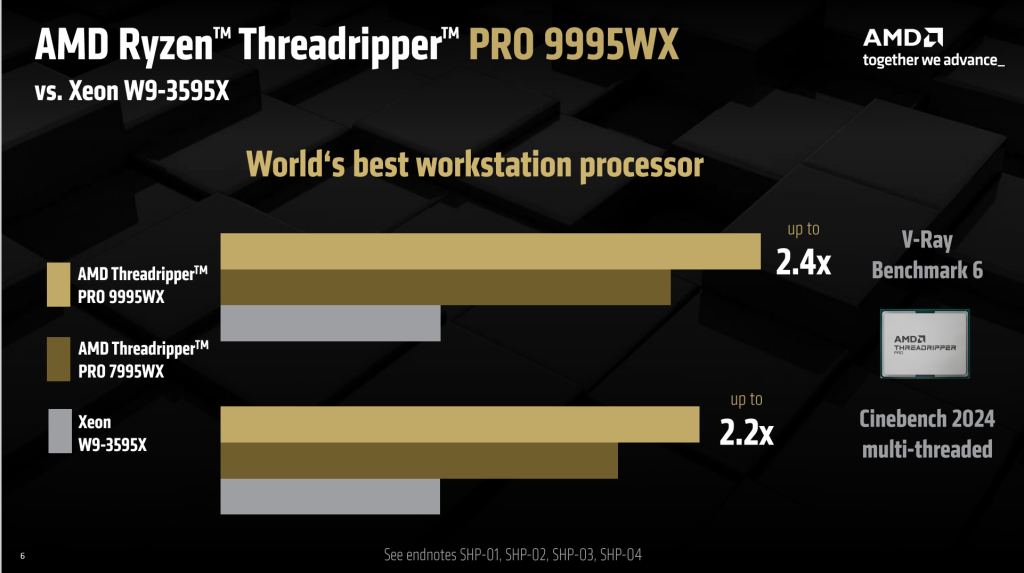
AMD has made some exciting claims about their new chips, not least of which is 2.2x the performance in rendering compared to its nearest Intel Xeon competitor.

This generation should provide up to 22% more performance over the 7000 series in threaded workloads, largely thanks to the change in architecture. As you can see below;

AMD Ryzen Threadripper Pro 9995WX

AMD is claiming a 2.4x speed increase compared to the previous generation PRO 7000 series chip, and a very impressive 2.2x performance increase compared to the Xeon W9-3595X – actually setting a Cinebench world record for workstations (Cinebench is an excellent benchmark for CPU testing).  

We’re also expecting significant uplift in performance across a range of the industries we serve with custom configured High-end desktops and workstations:

AMD Ryzen Threadripper Pro 9995WX vs Xeon W9 3595X

On paper then, the new PRO 9000 series is looking very exciting, offering a huge boost to creative workflows, next-level AI processing power and significant generational uplifts across a range of applications. 

But how will it fare on our test bench?

Our testing process

For our most recent tests, we wanted to benchmark performance of the PRO series processors when used in real-world applications that we help our customers build solutions for. This includes, high-end content creation, 3D rendering, game development, simulation and scientific computing and data science. We built our test rig (see our test configuration below) to represent a ‘typical’ workstation build and then ran the system through a range of applications at various levels of processor stress, to understand how the 9000 series would perform in every-day use.

In future blogs, we’ll be looking at how the 9000 series compares to the previous generation of chips and what that generational uplift means in practical terms. 

Test configuration

CPU: AMD Ryzen 9975WX 32-Core 64-Thread CPU
Motherboard: ASUS Pro WS WRX90E-SAGE SE Threadripper Motherboard
Memory: 64GB Micron DDR5 RDIMM 4800MHz CL40 (4x16GB)
Cooler: be quiet! Silent Loop 3 420mm Processor All-in-one liquid cooler
GPU: MSI GeForce RTX 1050 Ti 4GT LP

We kept the system configuration modest, using the minimum GPU and RAM speed we could to ensure that our tests were relying on the CPU as much as possible.

Key findings

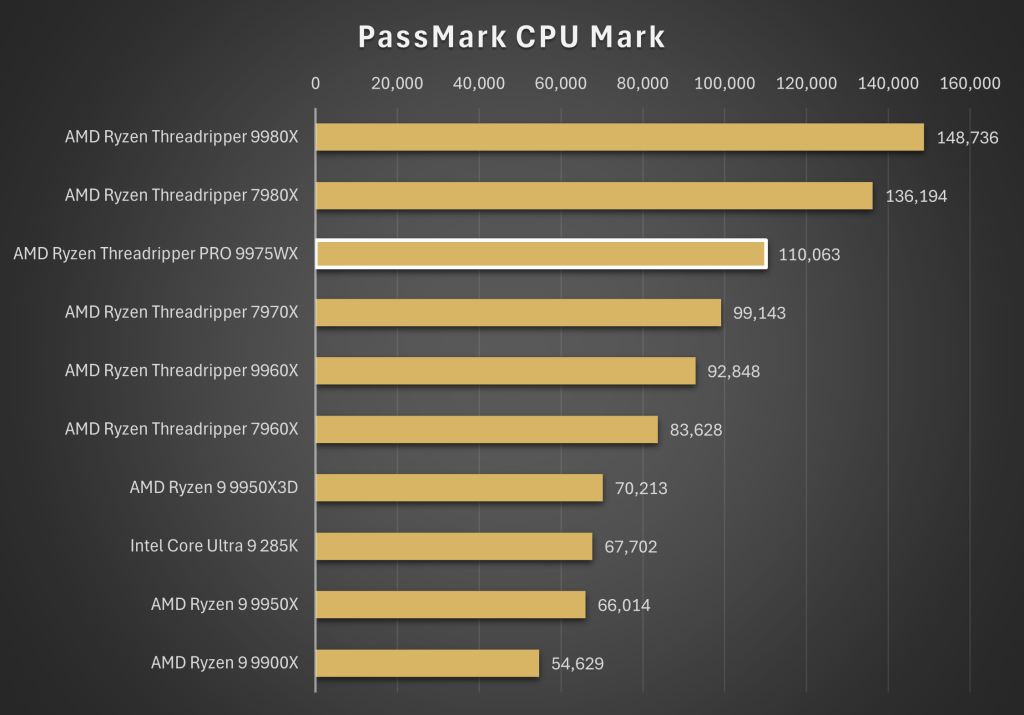
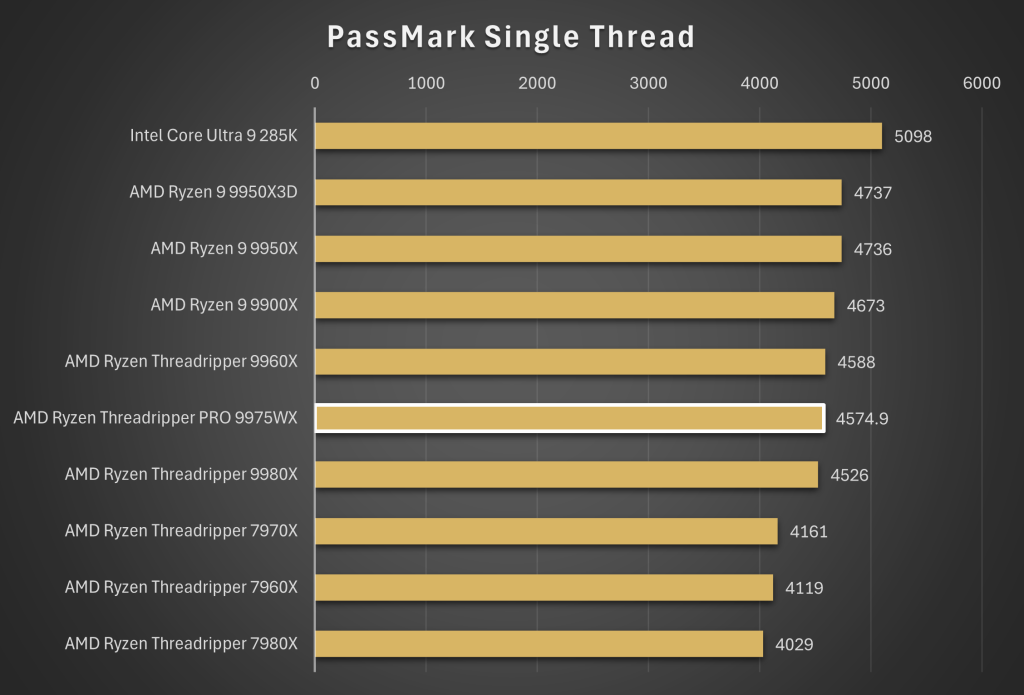
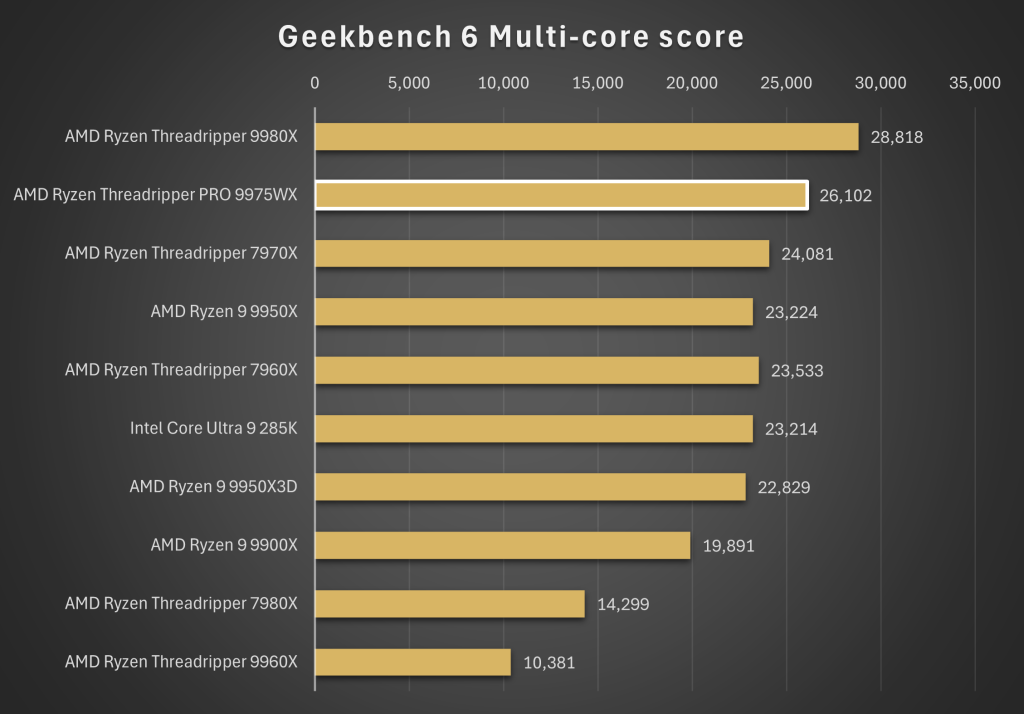
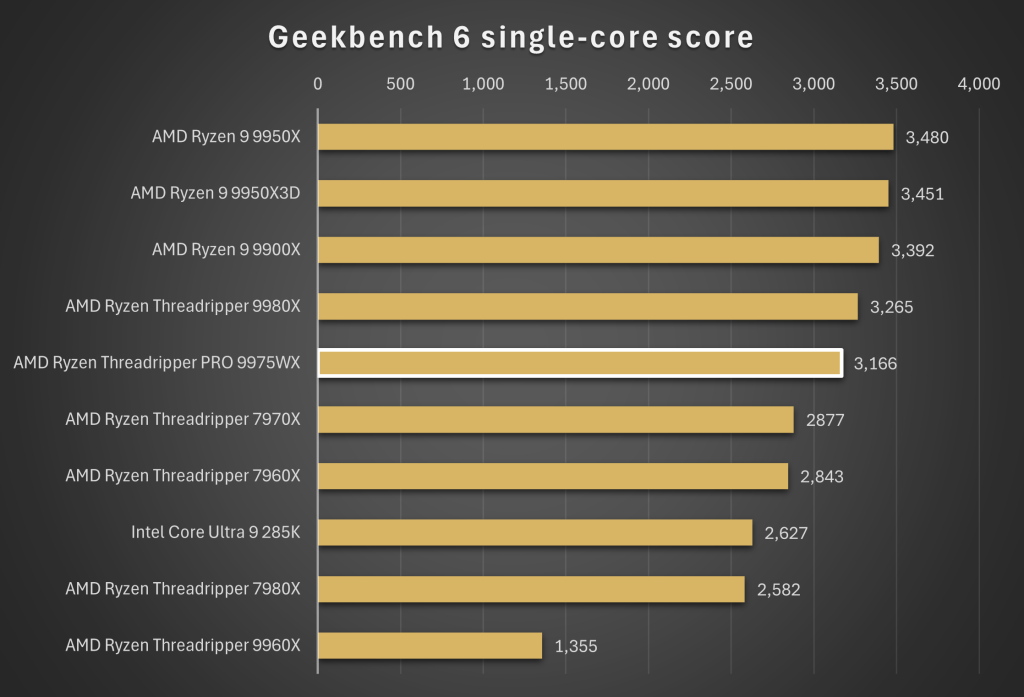
We ran our system through CPU intensive testing in PassMark and Geekbench, making a note of the average score across multiple tests and then compared them to some of the most popular high-end CPUs our customers ask for, including a mix of PRO and HEDT Threadrippers from this and the previous generation.

PassMark CPU Mark

No surprise here that the 9975WX performs exceptionally well in multi-threaded workstation workloads. In fact, it’s in a completely different class to commercial, high-end desktop CPUs such as the Ryzen 9 9950X and the Intel Core Ultra 9 285K.

The 9975WX is designed for heavy, multi-threaded applications and easily clears the 100k ceiling which is quite the performance indicator.

PassMark single thread

In our single-core tests, the 9975WX came roughly middle-of-the-pack, pretty much as expected. The Threadripper PRO’s strengths don’t lie in pure single-threaded applications, such as gaming, which is why the Ryzen 9 9950X3D fares much better.

Geekbench 5 multi-core score

A fantastic result in the Geekbench 6 multi-core test, with the 9975WX demonstrating its workstation focus and coming second only to the absolutely top-end 9980X in our testing.

Geekbench 6 single core score

And then finally the single-core performance is as expected again. The 9975WX is exceptional in heavily threaded, multi-core workloads and good, but not class-leading in single core applications.

9000 series for content creation

For high-end content creation, where it’s important to carry out multiple, demanding tasks simultaneously, and where the speed and efficiency of workflows is paramount, the Threadripper is unparalleled. While the price may make it overkill for creators who only need to perform a small amount of editing, if you’re working on multiple large projects simultaneously, or reliant on ultra-fast rendering or complex computational requirements like simulating lighting or textures, then a Threadripper is one of the best processors on the market.

Performance in Adobe Creative Cloud

If you’re using the Adobe Creative Cloud then your systems processor is really going to come to the fore when you’re video editing, rendering or carrying out any complex computational tasks that are often found in animation. 

Our testing shows that the 9975WX is a fantastic option when using applications that can spread the work across multiple cores. This means if you’re rendering, exporting, applying effects, or 3D rendering, this CPU will shave significant time off exports and previews.

With a Cinebench multi-core score of 3776.1, you’ll feel the power of this CPU in Premiere Pro or After Effects multi-frame rendering, but if your workload is more along the lines of light Photoshop / Illustrator work, you can opt for a commercial CPU.

Performance in DaVinci Resolve Studio

DaVinci Resolve Studio is one of the most powerful and popular video editing softwares on the market. We were keen to test what effect the new Zen 5 architecture would have when carrying out tasks in Da Vinci resolve.

Thanks to its high core count and strong multi-threaded performance, the 9975WX will provide smooth timeline performance, even when you’re working with 8K or RAW formats, especially if you pair it with a strong GPU. You will also notice the performance when you’re powering through final delivery renders, particularly if you’re outputting to CPU-based codecs.

9000 series for 3D rendering

Performance in Blender

We ran the 9975WX through demanding Blender tests and while the numbers won’t mean too much stand-alone, they do help to contextualise the CPU’s performance in 3D rendering:

Monster Scene: 518.39

Junkshop Scene: 355.65

Classroom Scene: 280.17

By comparison, the 9950X scores:

Monster Scene: 353.4

Junkshop Scene: 226.2

Classroom Scene: 171.3

(According to guru3D)

What this means in real terms is that the 9975WX massively outperforms mainstream CPUs meaning render times will be dramatically shorter for complex animations or high-resolution stills.

If your projects typically focus on GPU-rendering only, you might choose to opt for a commercial CPU like the 9950X, but if you’re working on high-end production rendering, challenging VFX and studio pipelines, the 9975WX delivers in terms of raw performance and expandability for workstation features (ECC memory and huge PCIe lane counts).

Performance in V-Ray

Like Blender, V-Ray supports both CPU and GPU modes, as well as hybrid CPU and GPU rendering. The 9975WX will deliver phenomenal throughput in pure CPU rendering, as well as supporting multiple GPUs, helping you avoid bottlenecking when using GPU or hybrid rendering. This makes it an exceptional choice for architectural visualisation, VFX pipelines and product visualisation.

9000 series for Game Development

Performance in Unreal Engine

In our tests the 9975WX took a little over 20 minutes to compile the Unreal Engine 5 source code, which is roughly half the time it would take a commercial CPU like the Ryzen 9 9950X or the Intel Core Ultra 9 285K, so if you’re a developer building Unreal from source, the latest series Threadripper could save you significant time.

Shader compilation and asset baking are heavily multi-threaded workloads which will benefit from the performance of the 9975WX, not to mention that Unreal dev work often requires multiple GPUs, huge amounts of RAM and fast NVMe storage. With ECC RAM support, 128+ GB memory capacity and an abundance of PCIe lanes, the 9975WX can make a great choice for a studio grade Unreal workstation.

9000 series for simulation and scientific computing

Performance in Ansys

For engineers working with ANSYS, whether in aerospace, automotive, or energy, the demands on both processing power and memory bandwidth are substantial. The AMD Ryzen Threadripper PRO 9975WX is built precisely for these workloads, delivering a combination of multi-core performance, massive memory capacity, and workstation-grade reliability that makes it a compelling choice for large-scale simulations.

Finite Element Analysis (FEA)

Large ANSYS mechanical simulations, such as complex, nonlinear FEA models with millions of elements, benefit immensely from high core counts. With 96 cores and exceptional multi-threaded performance (PassMark ~110,000; Cinebench multi-core ~3,776), the 9975WX significantly outpaces standard desktop CPUs. Its support for ECC memory ensures numerical accuracy in massive models, while the ability to handle hundreds of gigabytes of RAM keeps even the largest simulations running smoothly. Engineers can expect dramatic reductions in meshing and solving times, turning what used to be hours of computation into minutes.

Computational Fluid Dynamics (CFD)

ANSYS Fluent and CFX are highly parallel applications, scaling efficiently across many cores. Benchmarks from similar multi-threaded workloads like Blender and V-Ray show the 9975WX performing near the top of its class. High PCIe lane counts and support for multiple NVMe drives mean that large CFD simulations can leverage fast scratch storage and even multiple GPUs for coupled solvers. The result is cluster-level performance in a single workstation, allowing design iterations to move faster without resorting to expensive compute clusters.

Electromagnetics (HFSS, Maxwell, etc.)

Electromagnetic simulations often involve a mix of single-threaded pre-processing and multi-threaded solving. The 9975WX provides solid single-core performance (PassMark ST ~4,575; Cinebench single-core ~123) for interactive model setup, while its multi-core throughput accelerates the solve stage. This balance makes it a versatile choice for workflows that require both fast setup and heavy-duty computation.

Workstation reliability and expandability

Beyond raw performance, the 9975WX excels in mission-critical environments. ECC memory, massive RAM support, and extensive PCIe lanes ensure both accuracy and expandability, letting engineers scale their simulations confidently as project demands grow.

9000 series for data science

Many data science tasks such as large-scale feature engineering, preprocessing huge datasets, or running statistical models, benefit from high core counts, which is where the 9975WX excels. If you’re performing operations like batch data transformations, parallelised Python scripts or CPU-based machine learning, you can expect to see significant speed-ups compared to commercial desktop CPUs.

You should also factor in the huge amounts of RAM that the 9975WX gives you access to, meaning it can be the centre of a workstation that can easily handle massive datasets, tackle large-scale simulations or process big data, without the need to move to a distributed cluster.

And if you’re running deep learning or large-scale neural network training (with frameworks like TensorFlow or PyTorch), the 9975WX might not benefit you directly, but it does provide the large PCIe counts you will need to connect multiple, high-end GPUs efficiently.

WHO IS THE THREADRIPPER 9000 SERIES FOR?

If you have a CPU intensive, multi-threaded task where performance is more of a consideration than budget, then the Threadripper 9000 series is a great option. Whilst the HEDT chips are fantastic options for workstations, tackling highly-threaded workloads (such as video editing, rendering, 3D modelling, transcoding, running virtual machines and various engineering, data science and AI applications) with ease, the PRO series is really tailored towards high-end workflows. If you’re looking for the highest possible performance, or you’re reliant on the speed of your workflows or time-to-inference, then the PRO series is definitely for you.

In a future article, we’ll be doing a direct comparison of the 9000 series vs the previous generation Threadripper CPU, and letting you know if it’s worth the upgrade.

Get technical support

0151 3179860

Email sales